Design World

  • Home
  • Technologies
    • ELECTRONICS • ELECTRICAL
    • Fastening • joining
    • FLUID POWER
    • LINEAR MOTION
    • MOTION CONTROL
    • SENSORS
    • TEST & MEASUREMENT
    • Factory automation
    • Warehouse automation
    • DIGITAL TRANSFORMATION
  • Learn
    • Tech Toolboxes
    • Learning center
    • eBooks • Tech Tips
    • Podcasts
    • Videos
    • Webinars • general engineering
    • Webinars • Automated warehousing
    • Voices
  • LEAP Awards
  • 2025 Leadership
    • 2024 Winners
    • 2023 Winners
    • 2022 Winners
    • 2021 Winners
  • Design Guides
  • Resources
    • 3D Cad Models
      • PARTsolutions
      • TraceParts
    • Digital Issues
      • Design World
      • EE World
    • Educational Assets
    • Engineering diversity
    • Reports
    • Trends
  • Supplier Listings
  • Advertise
  • SUBSCRIBE
    • MAGAZINE
    • NEWSLETTER

AutoCAD 2019 with specialized toolsets released

By Leslie Langnau | March 22, 2018

Autodesk released its 2019 version of AutoCAD. Included in the release are multiple specialized toolsets to help improve design productivity.

Subscribers will have access to seven specialized toolsets, more than 750,000 intelligent objects, styles, parts, features, and symbols to choose from when drawing. Designers can automate floor plans; quickly draw piping, plant equipment, or electrical panel layouts; incorporate GIS data into the planning process; edit scanned drawings and convert raster images into DWG objects all while working in a familiar AutoCAD interface.

The toolsets are:
–Architecture Toolset: specialized building design features and 8,000+ intelligent architectural objects and styles speed architectural drawing and documentation.

–Mechanical Toolset: specialized mechanical design features and 700,000+ intelligent manufacturing parts, features and symbols speed product design.

–Electrical Toolset: specialized electrical design features and 65,000+ intelligent electrical symbols boost productivity for creating, modifying, and documenting electrical controls systems.

–MEP Toolset: specialized MEP engineering features and 10,500+ intelligent mechanical, electrical, and plumbing objects to draft, design, and document building systems.

–Plant 3D Toolset: specialized plant design and engineering toolset efficiently produces P&IDs and then integrates them into a 3D plant design model.

–Map 3D Toolset: specialized mapping features use GIS and CAD data to support planning, design, and data management. Access spatial data stored in files, databases and web services, and aggregates it with your AutoCAD design data.

–Raster Design Toolset: Use raster to vector tools to edit scanned drawings and convert raster images into DWG objects.

This update is available from the Autodesk Account portal, or from the Autodesk Desktop App.
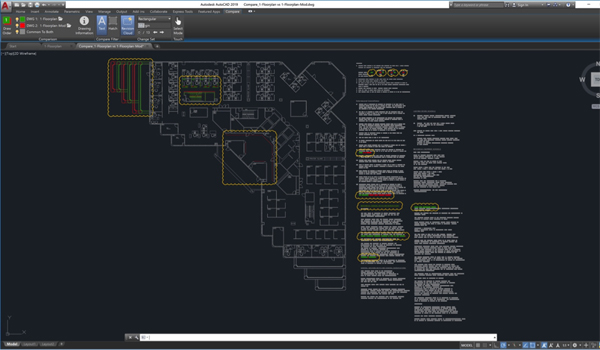
The DWG Compare feature in AutoCAD 2019 and AutoCAD LT 2019 helps users identify graphical differences between two revisions of a drawing or Xref. Quickly view changes, see clashes, review constructability, and more.

An AutoCAD 2019 or AutoCAD LT 2019 subscription also includes access to the all-new AutoCAD web app and the AutoCAD mobile app.

The AutoCAD web app gives users access to AutoCAD through web browsers or through web.autocad.com. This capability simplifies demos or consultations with clients.
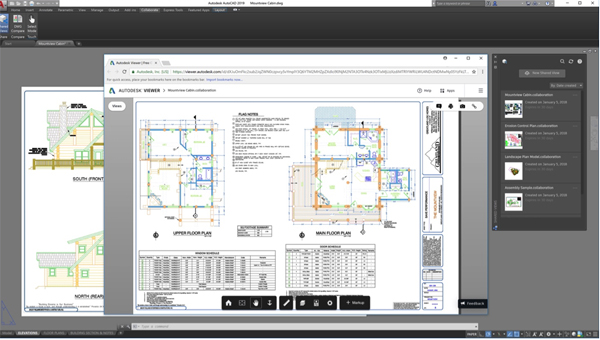
Shared Views is an enhancement to the “Share Design Views” feature. This AutoCAD 2019 and AutoCAD LT 2019 feature makes it easier to share designs with stakeholders without sending DWG files to them.

The AutoCAD mobile app lets users view, edit, create, and share CAD drawings anytime, anywhere. DWGs can be downloaded to devices to access them even without WiFi. This app is available across Windows, Android, and iOS devices, and is optimized for the iPhone X, iPad Pro, and Windows Surface.

Autodesk
www.autodesk.com

You might also like


Filed Under: 3D CAD World
Tagged With: autodesk
 

LEARNING CENTER

Design World Learning Center
“dw
EXPAND YOUR KNOWLEDGE AND STAY CONNECTED
Get the latest info on technologies, tools and strategies for Design Engineering Professionals.
Motor University

Design World Digital Edition

cover

Browse the most current issue of Design World and back issues in an easy to use high quality format. Clip, share and download with the leading design engineering magazine today.

EDABoard the Forum for Electronics

Top global problem solving EE forum covering Microcontrollers, DSP, Networking, Analog and Digital Design, RF, Power Electronics, PCB Routing and much more

EDABoard: Forum for electronics

Sponsored Content

  • Robot Integration with Rotary Index Tables and Auxiliary Axes
  • How to Choose the Right Rotary Index Table for Your Application
  • Designing a Robust Rotary Index Table: Engineering Best Practices for Long-Term Performance
  • Custom Integration Options for your New and Existing Rotary Table Applications
  • Tech Tips: Crossed Roller Bearing Update
  • Five Uses for the Parvalux Modular Range
View More >>
Engineering Exchange

The Engineering Exchange is a global educational networking community for engineers.

Connect, share, and learn today »

Design World
  • About us
  • Contact
  • Manage your Design World Subscription
  • Subscribe
  • Design World Digital Network
  • Control Engineering
  • Consulting-Specifying Engineer
  • Plant Engineering
  • Engineering White Papers
  • Leap Awards

Copyright © 2026 WTWH Media LLC. All Rights Reserved. The material on this site may not be reproduced, distributed, transmitted, cached or otherwise used, except with the prior written permission of WTWH Media
Privacy Policy | Advertising | About Us

Search Design World

  • Home
  • Technologies
    • ELECTRONICS • ELECTRICAL
    • Fastening • joining
    • FLUID POWER
    • LINEAR MOTION
    • MOTION CONTROL
    • SENSORS
    • TEST & MEASUREMENT
    • Factory automation
    • Warehouse automation
    • DIGITAL TRANSFORMATION
  • Learn
    • Tech Toolboxes
    • Learning center
    • eBooks • Tech Tips
    • Podcasts
    • Videos
    • Webinars • general engineering
    • Webinars • Automated warehousing
    • Voices
  • LEAP Awards
  • 2025 Leadership
    • 2024 Winners
    • 2023 Winners
    • 2022 Winners
    • 2021 Winners
  • Design Guides
  • Resources
    • 3D Cad Models
      • PARTsolutions
      • TraceParts
    • Digital Issues
      • Design World
      • EE World
    • Educational Assets
    • Engineering diversity
    • Reports
    • Trends
  • Supplier Listings
  • Advertise
  • SUBSCRIBE
    • MAGAZINE
    • NEWSLETTER
We use cookies to personalize content and ads, to provide social media features, and to analyze our traffic. We share information about your use of our site with our social media, advertising, and analytics partners who may combine it with other information you’ve provided to them or that they’ve collected from your use of their services. You consent to our cookies if you continue to use this website.